
Instructions for EARNER PLUS Members Only
Note: Earner & Learner Tiers do not have access to Moe's indicator in TradingView.
If you are interested in upgrading to use
Moe's Bread Recipe Indicator in your own TradingView account,
you must upgrade from Earner or Learner to "Earner Plus" in Moe's Whop.
This may only be done in Whop.com or the Whop app.
Earner Plus Members:
Please follow the directions below to add Moe's indicator to your TradingView Account
(you will have the opportunity to create an account if you do not have one)
Please FOLLOW ALL STEPS ON THIS PAGE
Follow all steps below to access:
1. The Stock Moe Bread Recipe Indicator in your own TradingView account.
2. How to connect to Moe's Discord for your membership content.
STEP 2: Get your Signal Key
Download Moe's Signal Key to help you understand the potential signals that may show up when you use Moe's Bread Recipe Indicator on your tickers.
Proceed to Step 3
STEP 3: Find your TradingView Username
OR Create a brand new TradingView account
Proceed to Step 4
STEP 4: Connect TradingView in Whop
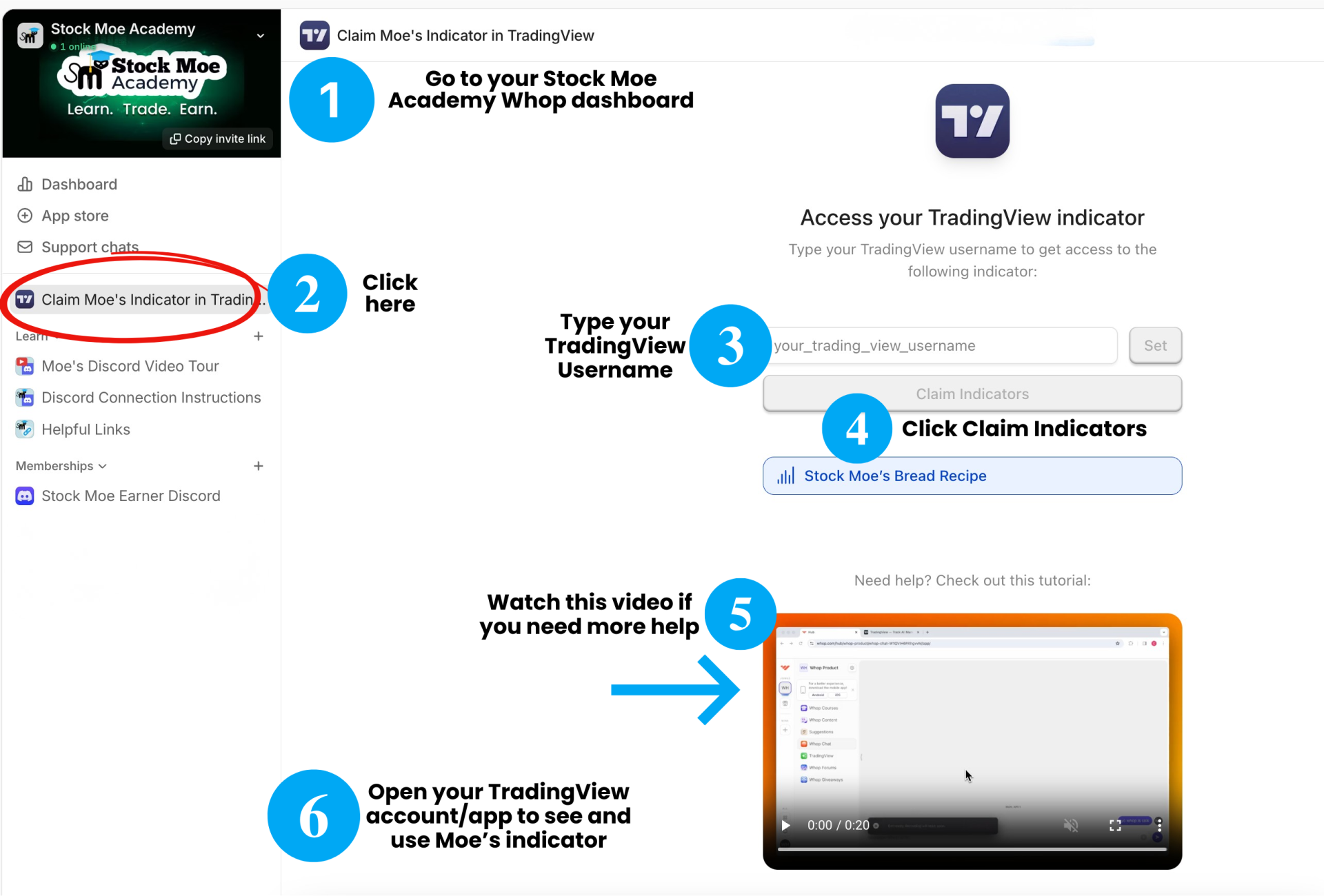
Proceed to Step 5
STEP 5: Verify that the indicator may be found in your TradingView account
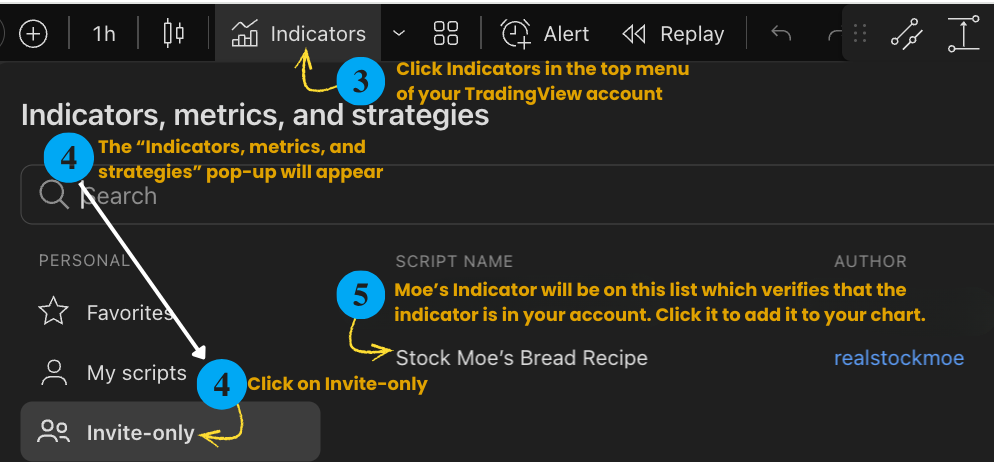
CONGRATULATIONS! You may now use Moe's Indicator on any ticker, for any time frame that is available in TradingView.
Remember your subscription to the Earner PLUS tier may be managed in your Whop dashboard.
Proceed to Step 6
STEP 6: Join Discord
To access Moe's livestream trading, the private bread-bot-alerts, chat with the community, and more, you need to link your Discord account to your Whop membership:
Return to Your Hub: Go to your Whop Dashboard and click on the Stock Moe Academy membership.
Click the Discord App: In your membership hub, look for the Discord icon or the section named Memberships and "Stock Moe Earner Discord."
Connect & Authorize: Click "Connect Account." A window will pop up asking you to authorize the Whop Bot. Click "Authorize" to link your Discord profile.
Claim Your Access: Once authorized, click the final "Claim Access" button. You will be automatically added to the server with your "Earner" or "Bread Recipe" roles already assigned!
Open your Discord Account: Open your Discord account in your Discord app or via Discord.com to see the Stock Moe Discord server. Start in the top section that says "New Members Start Here". Enjoy the membership!
Open your Discord Account: Open your Discord account in your Discord app or via Discord.com to see the Stock Moe Discord server. Start in the top section that says "New Members Start Here". Enjoy the membership!
Moe's Important Note
The Bread Recipe Indicator is a powerful tool to help you spot momentum or potential reversals, but remember that the signals are not buy or sell signals. Use the signals to find high-probability setups, but always perform your own due diligence before entering a trade.
Stock Moe
Founder, Stock Moe Bread Recipe Indicator
WANT MORE DETAILED INSTRUCTION ON TECHNICAL ANALYSIS FROM A LICENSED, AWARD-WINNING INVESTING COACH?
Take Moe's Technicals Analysis Master Course
LEARN TRADING WITH US
Invest in your future
We offer various educational content for all levels of traders as well as professional investors regardless of how much experience you have in trading.
Write your awesome label here.
Interested in seeing our other courses and learning programs?
Frequently asked questions
I clicked "Claim," but I still don’t see the "Invite-Only Scripts" folder in TradingView! What do I do?
First, try refreshing your TradingView page (Ctrl+R or Cmd+R). If it still isn't there, ensure you are logged into the same TradingView account whose username you entered in Whop. Sometimes people have an old account logged in on their browser by mistake!
Why do I see red exclamation marks (!) where the signals should be?
This usually means you aren't logged in. TradingView can't "verify" your access unless you are signed in. If you are logged in and still see them, double-check that you typed your Username correctly in the Whop Hub (no spaces or email addresses!).
How long do I have access to Moe's Bread Bot Indicator?
The membership is monthly and will re-billed automatically. You will continue to have access until you cancel or disconnect your TradingView account from Whop.
Can I upgrade to a lifetime membership that includes Moe's bread recipe indicator?
The memberships are only offered on a monthly basis. Annual or lifetime memberships are not available for the Earner PLUS tier.
I am new to TradingView. What can I do if I need help with that platform?
Utilize the TradingView Help Center if you need help using the TradingView platform.
https://www.tradingview.com/support/
https://www.tradingview.com/support/
Does the Bread Recipe work on the TradingView Mobile App?
Yes! Once you have added the indicator to your chart on your computer, it will automatically show up when you open the TradingView app on your phone. To add it fresh on mobile: Tap the "+" icon → Indicators → Invite-only scripts.
What can I do to help me understand Moe's indicator?
In addition to using the Signal Key that you may download on this page, you could watch Moe's livestream-trading sessions in Discord (check the Events tab or the #livestream-trading channel. Even watching replays will help you. Also, watch the mini lessons in the #class-library channel. If you want comprehensive instruction, consider taking Stock Moe's Technical Analysis course in Stock Moe Academy.
I am still having trouble. Who can I speak to?
If you’ve tried all of the above and are still stuck, don't worry! Head over to the #submit-a-ticket channel in our Discord, and our support administrator will help you get synced up.